# RabbitMQ and WebSockets
By Johan Rhodin. Published 10 October 2016.
##### Update 2018-07-24: Important notice
As of RabbitMQ version 3.7.7 the feature outlined in this blog post is no longer supported. Please visit our [Documentation](/docs/) and our [Blog](/blog/) for up to date information.
[Learn More](https://stomp-js.github.io/stomp-websocket/codo/extra/docs-src/Upgrade.md.html)
## RabbitMQ supports communicating using WebSockets, in this post we’ll look at how it works and what you can do with them
RabbitMQ is a multi-protocol message broker. Sometimes I feel that protocols such as Web-Stomp, MQTT and STOMP get left in the shadow behind the AMQP protocol. In this blog post we’ll explore the Web-Stomp protocol and how it can be used with RabbitMQ to build interactive web applications.
What are WebSockets? It’s a way to send real time data between a client (such as a web browser) and a web server, allowing for highly interactive user experiences with data stored or computed on a server.
### WebSockets and RabbitMQ
To use WebSockets with RabbitMQ in CloudAMQP you simply enable the `rabbitmq_web_stomp` plugin in the CloudAMQP Control Panel. This will enable the “Rabbit WEB-STOMP - WebSockets to Stomp adapter”. The adapter makes it possible to communicate with exchanges, queues, etc in RabbitMQ over the STOMP (Simple Text Oriented Messaging Protocol) protocol. STOMP is a very simple protocol similar to HTTP. STOMP is then carried over WebSockets (given the name Web-Stomp), enabling in-browser applications. This can be compared with typical AMQP that is usually carried over TCP.
We recommend that you create a unique user for the Web-Stomp access. This can be done by creating a user in the RabbitMQ Management Interface, and give it a virtual host (vhost) that only has access to a certain queue. **Note: The Web-STOMP plugin is only available on dedicated plans.**
### Sample application
Let’s build a sample chat application that uses queues and Web-STOMP to communicate with a web page, where we’ll send and display chat messages. We’ll start by loading sock.js and stomp.js:
```html
```
To connect:
```javascript
// Create a WebSocket connection. Replace with your hostname
var ws = new SockJS("https://blue-horse.rmq.cloudamqp.com/stomp");
var client = Stomp.over(ws);
// RabbitMQ Web-Stomp does not support heartbeats so disable them
client.heartbeat.outgoing = 0;
client.heartbeat.incoming = 0;
client.debug = onDebug;
// Make sure the user has limited access rights
client.connect("webstomp-user", "webstomp-password", onConnect, onError, "vhost");
```
Now we can write our functions that will be called to send messages and write out messages.
```javascript
//Start subscribing to the chat queue
function onConnect() {
var id = client.subscribe("/exchange/web/chat", function(d) {
var node = document.createTextNode(d.body + '\n');
document.getElementById('chat').appendChild(node);
});
}
//Send a message to the chat queue
function sendMsg() {
var msg = document.getElementById('msg').value;
client.send('/exchange/web/chat', { "content-type": "text/plain" }, msg);
}
function onError(e) {
console.log("STOMP ERROR", e);
}
function onDebug(m) {
console.log("STOMP DEBUG", m);
}
```
If we add a small base of HTML around this and run it as an application it will look like this when you run it:
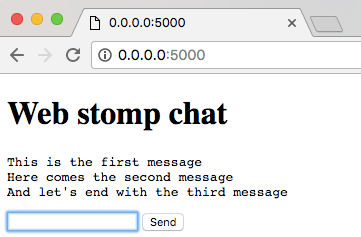
The full source code for this project can be found here: [Web-Stomp example application](https://github.com/cloudamqp/web-stomp-example)
I hope you’ve enjoyed learning about WebSockets and Web-Stomp. It can really bring out new possibilities and ideas that were not available before the introduction of this plugin.
### Further reading
[CloudAMQP Web-Stomp documentation](/docs/stomp-over-websockets/)
[RabbitMQ Web-Stomp Plugin](https://www.rabbitmq.com/web-stomp.html)
[Chapter 4 of the WebSocket book](https://www.safaribooksonline.com/library/view/websocket/9781449369262/ch04.html)
Please email us at [contact@cloudamqp.com](mailto:contact@cloudamqp.com) if you have any suggestions, questions or feedback.