What the Broker logstream page shows you
Open your cluster in the console and go to the Broker logstream page. The page fills with the last three hours of your broker’s log, then continues to follow it live. Each line tells you when it happened, which server in the cluster wrote it, and how serious it is.
It is the first place to look when something is off, and now it is one click away for every dedicated cluster. A self-hosted setup usually needs a separate monitoring stack to get this kind of visibility. Here, it is included as part of running a managed cluster.
A few situations where it earns its place:
- An application keeps reconnecting. The broker log shows you which user, from which address, and why the connection was closed.
- Something happened an hour ago. You no longer need to have had the page open. Three hours of history are waiting when you arrive.
- You just upgraded. Watch the nodes come back and confirm they joined the cluster, without opening a support ticket to ask.
- A queue vanished. Deletions are logged, and the log says who did it.
How it works
Every CloudAMQP server already writes its logs to the operating system’s journal, and every server already runs a small collector agent that we use for the log and metrics integrations you can configure in the console. The new pipeline reuses that agent.
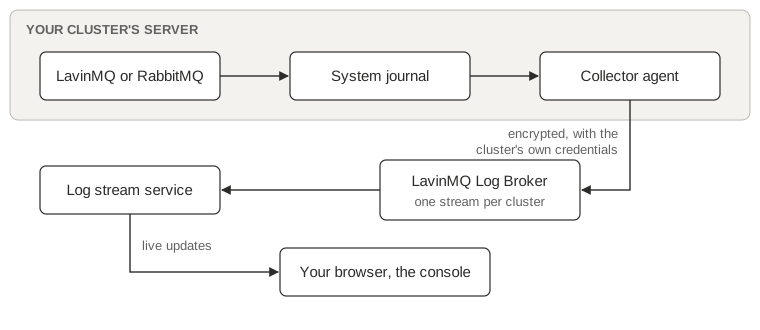
The collector reads the journal, keeps only the broker’s own lines, and sends them, encrypted, to a LavinMQ cluster that we run for exactly this purpose, called the Log Broker. Each customer cluster has its own stream on the Log Broker, and nothing else can write to it or read from it.
When you open the log page, a service connects to your cluster’s stream, starts reading three hours back, and pushes each line to your browser as it arrives. Close the page and the service disconnects. Your broker never sees any of this traffic. It just writes its log, as it always has.
Built on LavinMQ streams
The Log Broker is a LavinMQ cluster, and each customer cluster’s logs are written to a LavinMQ stream. A stream is an append-only log inside the broker: messages are written once and kept in order, and any reader can choose where to start reading, including a point in the past. Retention is set by age and size, so old lines age out on their own. LavinMQ streams work the same way everywhere, not just for this internal use: any RabbitMQ or LavinMQ client can declare a stream queue and read it back from any point in its history.
That is exactly the shape a log has, and it is why you see history when you open the page: the reader simply asks the stream for everything from three hours ago onwards. Nothing is copied or buffered elsewhere.
It is also a case of using our own product. The Log Broker accepts a connection from every server in the CloudAMQP fleet, making it one of the largest single LavinMQ deployments we operate. We get to see how LavinMQ behaves under a real production load every day, on a workload where the cost of being wrong is a missing log line rather than a customer’s message.
Security, in plain terms
A log pipeline that touches every cluster must be built so that a compromised server cannot access anyone else’s logs. The design rests on a few rules:
| Guarantee | What it means |
|---|---|
| Logs never pass through your broker | The collector reads the journal on the server and talks directly to the Log Broker over an encrypted connection. |
| Each cluster has its own credentials | The server’s credential can only write to its own stream; the console’s credential can only read it. Neither can create, change, or delete anything. |
| Nothing shared is stored on your server | The server’s credential is derived per cluster from a secret only the control plane holds, so it exposes one cluster’s write-only password and nothing else. |
| The console page is access-controlled | A signed token, bound to your cluster, is issued only to a user who can already see that cluster in the console. |
And of course, only what your broker already writes to its own log is ever collected. Message contents are never part of it.
Available now
The Broker logstream page is live in the CloudAMQP console today for every dedicated LavinMQ and RabbitMQ cluster. Shared plans do not have a broker log view because the broker’s log covers multiple customers at once.
If you run a dedicated cluster, open the Broker logstream page and have a look at what your broker has been up to. If you want the full story of how it is built, from the collector configuration to why the connection heartbeats are set as they are, read How we moved CloudAMQP’s broker logs off the broker.
FAQ
Does the broker log view work for RabbitMQ as well as LavinMQ?
Yes. Every dedicated CloudAMQP cluster gets the same Broker logstream page, whether it runs RabbitMQ or LavinMQ.
How much log history does it keep?
Three hours, from the moment you open the page. It keeps following the log live after that.
Is the broker log view available on shared plans?
No. Shared plans are excluded because the underlying broker log covers multiple customers, whereas only a dedicated cluster’s log belongs to a single customer.
Does the collector agent send anything other than log lines?
No. It only forwards what the broker already writes to its own log, over an encrypted connection to a dedicated LavinMQ stream for that cluster. Message contents are never part of it.
 Magnus Landerblom