Message queues sound more complicated than they are. Once you’ve seen a message travel through one, most of it falls into place, so that’s how this guide works: a little explanation, then a small simulation you can try along the way.
What is a message queue?
Let’s start with the basics:
- A producer sends messages. It can be a web app, a service or a device.
- A message is a small piece of data that describes some work: an order to process, an email to send, a reading from a sensor.
- The queue holds the messages, in order, until a consumer takes them.
- A consumer takes messages from the queue and handles them, like sending an email or resizing a photo.
- The message broker is the software that keeps the queues and moves the messages. RabbitMQ and LavinMQ are two examples.
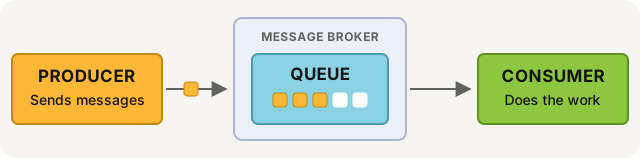
If you like real-world comparisons, think of a busy restaurant kitchen. The waiter writes the order on a note, pins it on the rail and goes back to the guests. Nobody stands around waiting for the food to be ready. A cook takes the note when there’s a free pair of hands, and on a busy night, the notes simply line up on the rail until someone gets to them. The waiter is the producer, the note is the message, the rail is the queue and the cook is the consumer.
Follow one message
Now let’s see the parts work together. A photo app sends a message, the queue holds it, and an image service picks it up and resizes the photo. Click through the steps and keep an eye on the message, especially at the end.
Try it: the life of a message
Someone uploads a photo. Click Next to follow it.
Why use a message queue?
Picture two services that talk to each other directly. One asks, the other answers, and while it waits for that answer, the first one can’t do much else. Most days, that’s fine. But the day the other service gets slow, or busy, or goes down for a few minutes, the waiting spreads. Requests pile up, and sooner or later, they start to fail.
A queue changes the conversation. Without one, it’s like a phone call: both sides have to be there at the same time, and the caller waits until the other side answers. With a queue, it’s more like email. You send it, get on with your day, and the other person reads it when they can. That’s what people mean by asynchronous communication. The producer only needs the queue to be running, and the consumer gets to work at its own pace.
The difference is easiest to see when a lot happens at once, so let’s try it.
Try it: send a traffic spike
The email service can handle 4 requests per second. Send a burst of 40 requests and see what happens with and without a queue.
Without the queue, a request can only wait a short time for the email service to be free. When that time runs out, it fails, just like a web request that times out. With the queue, the extra requests wait their turn instead. It takes a little longer, but nothing gets lost, and that’s a trade almost every system is happy to make.
That’s the core of it. A message queue gives you:
- Room for traffic spikes. The queue takes the extra messages during a burst, and the consumers work through them at their own pace.
- Reliability. If a consumer crashes, its messages stay in the queue until it’s back, or until another consumer takes them.
- Easy scaling. Is the queue growing? Add more consumers.
- Parts that work on their own. The producer and consumer don’t need to know about each other, run at the same time or be written in the same language. This is called decoupling.
We saw all of this up close when we built our own AI agent. The first version called the AI model directly and waited for the answer. It worked well, right up until the answers got slow. When we put a queue in the middle, the slow jobs simply waited their turn, and nothing else had to wait with them. I wrote more about it in Nobody talks about message queues. That’s the point.
How it works, step by step
You already followed one message through the queue. Here are the same steps again, this time with their real names, the ones you’ll meet as soon as you start using a broker:
- Publish. The producer sends a message to the broker.
- Route. The broker puts the message in the right queue.
- Consume. A consumer gets the message from the queue.
- Acknowledge. When the consumer is done, it sends an acknowledgement, an ack, back to the broker. Only then does the broker delete the message.
That last step is the one I’d point at if someone asked why queues are so dependable. Acks keep messages safe on the consumer side. Until the ack arrives, the broker keeps the message, so if the consumer dies halfway through the work, the broker simply sends the message again.
The producer side has the same kind of safety net, called publisher confirms. The broker tells the producer when it has the message. If no confirm comes back, the producer knows it should send the message again.
Playground: producers, consumers and a growing queue
Now it’s your turn to run the system. There’s no wrong way to use this one, so go ahead and push it.
Try it: keep the queue in balance
Set how many messages come in and how long each one takes. Add consumers, or stop one in the middle of a message and see it go back to the queue.
Try making the producer faster than the consumers, and watch the queue grow. Then add a consumer and watch it shrink. You can also stop a consumer in the middle of a message and see the message go back to the queue, ready for someone else.
That’s really the whole balancing act. When messages come in faster than the consumers can handle them, the queue grows. It’s fine if the queue grows for a while, for example during a spike, because that’s exactly what it’s there for. But if it keeps growing, you need more consumers, or faster ones.
When you don’t need a message queue
We host message brokers for a living, but a queue isn’t always the answer, and it’s worth saying so. If the user is waiting for an answer, like a price or a login, a direct call is simpler. And if you only have a handful of background jobs a day, your database, or Redis if you already use it, can be enough. But if you expect the volume to grow, it’s easier to add a message queue early than to move everything over when the traffic is already there.
A good sign that it’s time for a message queue: one slow service is slowing down the others, traffic comes in bursts, or you keep writing retry logic by hand.
Message queue, message broker or event streaming?
These words get mixed up a lot, so here’s the short version. A message queue is the line of messages waiting to be processed. A message broker is the software that keeps the queues and moves messages between producers and consumers. Event streaming, like Apache Kafka or RabbitMQ streams, keeps the messages so they can be read again and again. They’re removed when they get too old, or when the stream gets too big.
In other words, a queue is about getting work done, once. A stream is about keeping a history that many readers can replay. Read more in when to use RabbitMQ or Apache Kafka.
What people use message queues for
Queues turn up in all kinds of systems, but the jobs they do tend to look alike. The most common ones are:
- Background jobs. Send the email, generate the PDF or resize the image after the user gets a response.
- Long-running tasks. Jobs that take a while, like video encoding, big reports and AI jobs.
- Microservices. Services talk through queues instead of calling each other.
- IoT. Thousands of devices send readings that the backend processes at its own pace.
Try it for real
The simulations are fun, but nothing beats sending your first real message. Here’s what it looks like in code. A producer and a consumer are separate programs, so this small Python example comes in two parts. The producer sends a message to a queue:
import pika

connection = pika.BlockingConnection(pika.URLParameters("amqp://localhost"))
channel = connection.channel()
channel.queue_declare(queue="photos")

channel.basic_publish(exchange="", routing_key="photos", body="resize photo 1042")
print("Sent: resize photo 1042")
connection.close()
The consumer takes the message from the queue, does the work and sends an ack:
import pika

connection = pika.BlockingConnection(pika.URLParameters("amqp://localhost"))
channel = connection.channel()
channel.queue_declare(queue="photos")

def handle(ch, method, properties, body):
    print("Resizing:", body.decode())
    ch.basic_ack(delivery_tag=method.delivery_tag)

channel.basic_consume(queue="photos", on_message_callback=handle)
channel.start_consuming()
It’s the same photo, the same queue and the same ack as in the simulation, just in code. You can do the same in almost any programming language. On the clusters we run at CloudAMQP, Java and Node.js are the most common.
When you want to try it yourself, read RabbitMQ for beginners or LavinMQ for beginners.
Did something in this guide not make sense? Tell me in the comments, or email me at lovisa@cloudamqp.com. I’d love to make it better.
 Lovisa Johansson