Choosing the right messaging solution shouldn't feel like a guessing game. While many platforms offer similar capabilities, the best choice depends entirely on your architecture, operational constraints, and long-term goals. To help you make that decision, this article breaks down the differences between RabbitMQ and Azure Service Bus, not just at a feature level, but in how they behave in real systems.
When you build a distributed system on Azure, synchronous calls often work well at first. But as the system grows, they can stop scaling, and messaging becomes unavoidable.
Typically, the conversation starts like this:
"We're already on Azure, let's just use Azure Service Bus."
But while Azure's native tooling is convenient, RabbitMQ is often chosen for its routing flexibility, low latency, and cloud-agnostic portability.
This comparison isn't about declaring a single winner. It's about understanding how each system works internally, what guarantees it provides, and which trade-offs matter for your architecture and team.
What problem do both systems solve?
Both RabbitMQ and Azure Service Bus provide asynchronous messaging to decouple producers and consumers. They allow systems to absorb traffic spikes, retry work on failure, scale producers and consumers independently, and avoid tight temporal coupling.
On the surface, messaging systems look similar — producer → broker → consumer. The differences become apparent when you look at messaging primitives, message flow, delivery semantics, and operational responsibility.
New to message queuing? Start with the fundamentals: What is message queuing?
Terminology used in this article
Messaging systems often use different terms for similar concepts. In RabbitMQ, applications publish messages to exchanges, which route messages to queues. Consumers then read messages from those queues.
In Azure Service Bus, messages are sent either to queues or to topics. When a message is sent to a topic, the service distributes it to one or more subscriptions, and each subscription behaves like an independent queue that consumers read from.
The terminology used by the systems maps roughly as follows:
| Concept | RabbitMQ | Azure Service Bus |
|---|---|---|
| Application sending messages | Producer / Publisher | Sender |
| Application receiving messages | Consumer | Receiver |
| Routing component | Exchange | Topic |
| Message storage | Queue | Queue or Subscription |
| Routing rule | Binding | Subscription filter |
| Messaging system | Broker | BrokerService |
In this article, a message refers to the data sent between a producer and a consumer. In practice, messages often represent events, commands, requests, or tasks depending on the system design.
To keep the explanations consistent, this article will primarily use the AMQP-style terminology (producer, exchange, queue, consumer). When discussing Azure Service Bus concepts, topics and subscriptions will be referenced where needed. This simplification helps focus on the architectural differences between the systems rather than switching terminology throughout the article.
Message flow and core primitives
RabbitMQ: Broker-level routing and push delivery
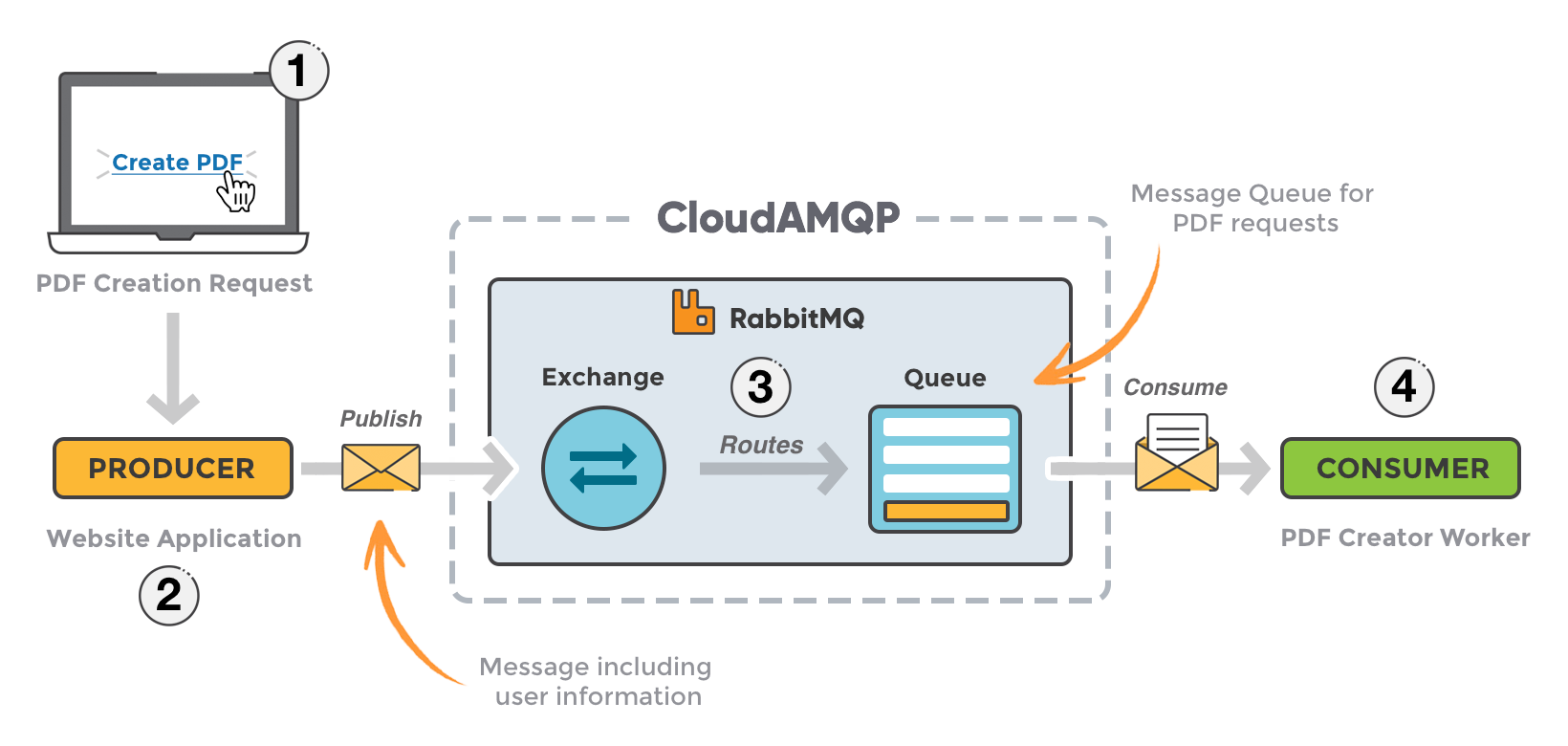
RabbitMQ is built around exchanges, bindings, and queues.
Message flow:
- A producer publishes a message to an exchange
- The exchange evaluates routing rules (bindings)
- Messages are routed to one or more queues
- The broker pushes messages to consumers
- Consumers explicitly ack or nack messages
Routing logic lives inside the broker. This enables advanced patterns such as topic routing, fanout, and header-based filtering using exchanges. Flow control is handled using QoS / prefetch, allowing consumers to control how many messages they receive before acknowledging.
Azure Service Bus: Entity-based messaging with platform control
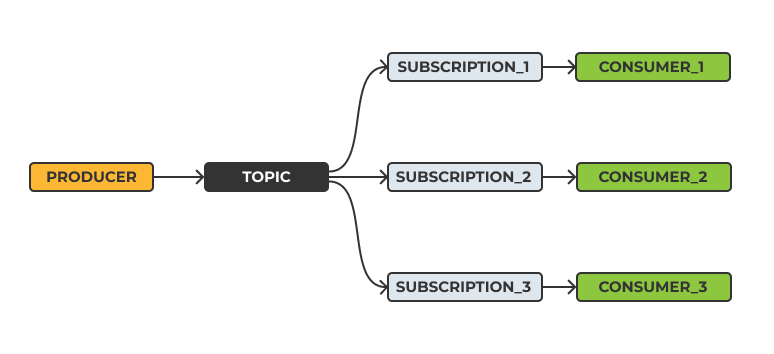
Azure Service Bus is a fully managed messaging service in Azure. Queues support point-to-point messaging, where each message is processed by a single consumer. Topics and subscriptions implement publish/subscribe patterns, allowing multiple independent consumers to each receive a copy of the same message.
Message flow:
- A producer sends a message to a topic or queue.
- Messages are persistent by default, unlike in RabbitMQ, where message durability must be explicitly configured.
- Topics fan out messages to subscriptions, where each subscription acts as an independent queue for its consumers.
- Consumers pull messages using a lock-based model, where a message is temporarily locked during processing.
- The consumer either completes the message (removing it from the queue) or abandons it (making it available for redelivery).
Routing happens at the subscription level using filters (for example, SQL-like rules that match message properties such as
type = 'order.created'
). Many behaviours, such as retries, dead-lettering, ordering, and delivery guarantees, are enforced by the broker.
Delivery semantics and consumer behavior
The two brokers share many similarities and aim to solve the same problems. However, they differ in how messages are delivered and how consumers interact with them.
Delivery semantics describes how messages are handed off, acknowledged, and retried. Consumer behavior refers to how applications receive and process those messages — whether the broker pushes messages to consumers or consumers pull them on demand.
These differences have a direct impact on system design, throughput, and failure handling.
RabbitMQ: Smart routing and push-based delivery
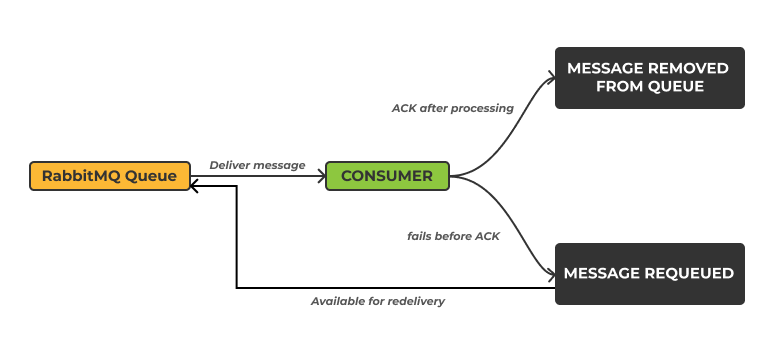
The broker pushes messages to consumers as they become available. The standard message flow typically works like this:
- Messages are sent to an exchange, which routes them to one or more queues for storage.
- The broker actively delivers these messages to connected consumers.
- After successfully processing a message, the consumer sends an acknowledgment (ACK) back to the broker.
- Once acknowledged, the message is permanently removed from the queue.
- If a consumer fails or disconnects before acknowledging, the broker detects the loss, requeues the message, and makes it available for another consumer to process.
RabbitMQ also provides several mechanisms to control how messages are delivered:
Prefetch – This limits the number of unacknowledged messages a consumer can receive at once. Setting a prefetch limit prevents individual consumers from being overwhelmed and helps enforce natural back pressure.
Re-queueing – Failed, rejected, or unacknowledged messages can be placed back into the queue at their original position for redelivery.
Flexible consumer patterns – Developers can design consumers to optimize throughput or ordering depending on the workload.
In RabbitMQ, queues and consumers can be configured to impact the message ordering. A single consumer reading from a queue can preserve message order. However, when multiple consumers process messages concurrently, ordering is no longer guaranteed.
Because RabbitMQ exposes more of these controls to the developer, it provides fine-grained control over message flow and performance. However, that flexibility comes with more responsibility: you may need to configure and tune RabbitMQ to meet your reliability and throughput goals.
Azure Service Bus: Pull-based polling and peek-lock
Azure Service Bus uses a pull-based, peek-lock model to control message delivery and guarantees. In this model, messages are not removed from the queue upon receipt. Instead, they are temporarily locked for a specific consumer to ensure exclusive processing, while still allowing for automatic recovery in case of a failure.
The following illustrates how this lock-based delivery and settlement process works:
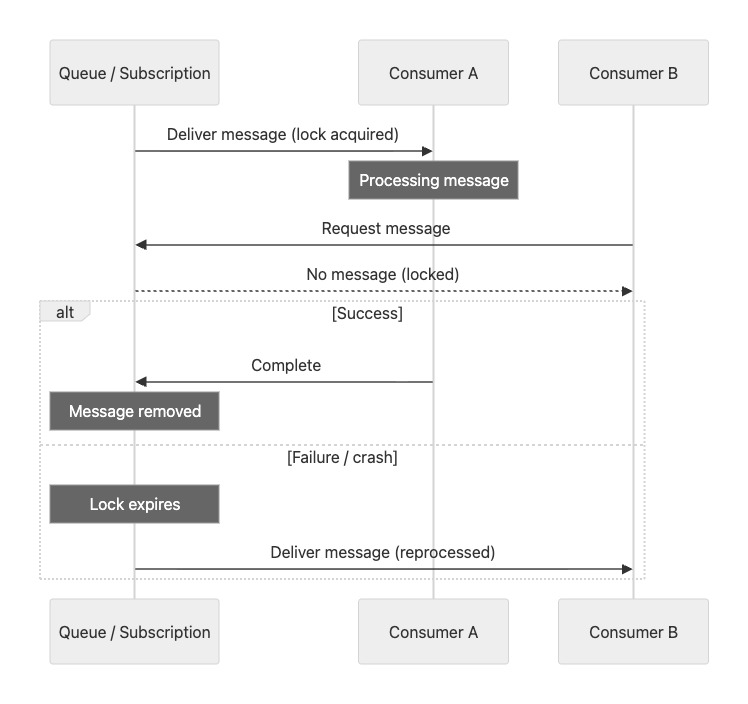
The interaction between the consumer and the broker is governed by this model:
- A consumer receives a message without it being removed from the queue.
- The message is locked to prevent other consumers from processing it.
- The consumer must explicitly settle the message by completing or abandoning it.
The consumer sends one of the following responses:
Complete – indicates successful processing, and the message is removed from the queue.
Abandon – indicates the message could not be processed. The lock is released, and the message becomes available again.
If the consumer crashes or does not respond before the lock expires, the message automatically becomes available again for processing.
When multiple consumers are connected to the same queue or subscription, Azure Service Bus distributes messages among them, typically in a round-robin-like fashion. This helps balance the workload across consumers and prevents any single consumer from being overwhelmed.
Dead-lettering and failure handling
Both systems support dead-letter queues, but for different reasons. Dead-lettering refers to the process of moving messages that cannot be successfully processed (for example, after repeated failures or invalid data) to a separate queue for later handling.
Failure handling in RabbitMQ
Dead-lettering is configured using queue policies, message TTLs (time-to-live), and explicit reject or negative acknowledgment behavior from consumers. For example, messages can be routed to a dead-letter queue when they expire, are rejected by a consumer, or exceed retry limits. This offers flexibility, but also shifts responsibility to the operator.
Failure handling in Azure Service Bus
Messages are automatically dead-lettered when max delivery count (the number of times a message has been delivered to consumers for processing) is exceeded, message TTL expires, or session or lock handling fails. Dead-lettering is broker-managed and deterministic, meaning messages are moved to the dead-letter queue automatically based on predefined rules without requiring custom consumer logic.
What this means in practice
Azure Service Bus takes a more opinionated approach. Dead-lettering is handled automatically by the broker based on predefined rules such as delivery count and message expiration. This reduces the amount of error-handling logic developers need to implement and leads to more predictable behavior.
In contrast, RabbitMQ provides more flexibility but requires developers to explicitly configure dead-letter exchanges and routing. This gives greater control over failure handling but also increases the risk of misconfiguration and operational complexity.
Protocols and interoperability
The protocol difference matters. Azure Service Bus is built on AMQP 1.0, while RabbitMQ historically used AMQP 0.9.1 as its native protocol. RabbitMQ added AMQP 1.0 support via a plugin, and in newer versions (4.0 and later), AMQP 1.0 is supported natively. However, this does not change the underlying messaging model of RabbitMQ, which is still built around exchanges, bindings, and queues. As a result, sharing protocol support does not imply interoperability, and clients are not directly interchangeable without adaptation.
| Aspect | RabbitMQ | Azure Service Bus |
|---|---|---|
| Protocol | AMQP 0.9.1, AMQP 1.0 | AMQP 1.0 |
| Routing primitives | Exchanges + bindings | Topics + subscriptions |
| Client compatibility | Broad ecosystem | Azure SDK-centric |
Minimal producer/consumer examples
The following examples highlight behavioral differences rather than syntax trivia.
Python – RabbitMQ
import pika

conn = pika.BlockingConnection(pika.ConnectionParameters("localhost"))
channel = conn.channel()
channel.queue_declare(queue="jobs")

channel.basic_publish(
    exchange="",
    routing_key="jobs",
    body="hello rabbit"
)

def handler(ch, method, properties, body):
    print(body)
    ch.basic_ack(method.delivery_tag)

channel.basic_consume(queue="jobs", on_message_callback=handler)
channel.start_consuming()
Behavior
- Broker pushes messages
- Acks remove messages immediately
- Prefetch controls flow
Python – Azure Service Bus
from azure.servicebus import ServiceBusClient

client = ServiceBusClient.from_connection_string(CONN)
sender = client.get_queue_sender("jobs")

with sender:
    sender.send_messages("hello service bus")

receiver = client.get_queue_receiver("jobs")
with receiver:
    for msg in receiver:
        print(msg)
        receiver.complete_message(msg)
Behavior
- Messages are locked
- Explicit complete/abandon
- Broker manages retries
Full comparison table
| Capability | RabbitMQ | Azure Service Bus | Why it differs |
|---|---|---|---|
| Routing | Exchanges + bindings | Topics + subscriptions | Broker-centric vs entity-centric |
| Delivery model | Push | Pull (peek-lock) | Flow control location |
| Ordering | Queue-level | Session-based | App vs Broker |
| Dead-lettering | Policy-driven | Automatic | Operator vs service |
| Retries | Consumer-driven | Broker-driven | Failure semantics |
| Protocol | AMQP 0.9.1 (primary), AMQP 1.0 support | AMQP 1.0 | Different abstractions |
| Portability | High | Azure-only | Deployment model |
| Ops model | Self/managed | Fully managed | Control vs abstraction |
Operational model and portability
RabbitMQ scales horizontally through clustering, federation, and shovels, providing greater flexibility in how the messaging infrastructure is deployed and expanded. Running RabbitMQ directly provides maximum control, but it also requires operational effort to manage availability, upgrades, and monitoring.
RabbitMQ can run in environments such as Docker and Kubernetes. This allows the same messaging architecture to run across different cloud providers or on-prem environments.
Azure Service Bus is a fully managed platform that runs within Azure and is not available as a self-hosted service. Unlike RabbitMQ, it cannot be deployed in Docker or Kubernetes environments. Applications can run anywhere, but the messaging infrastructure itself remains tied to Azure.
How to decide
When choosing between RabbitMQ and Azure Service Bus, consider the following factors:
Messaging primitives – RabbitMQ uses exchanges and routing keys, giving developers fine-grained control over how messages are routed. Azure Service Bus provides higher-level constructs such as topics, subscriptions, sessions, and locks, which offer built-in patterns for routing, ordering, and delivery guarantees. This difference affects how much control you have versus how much functionality is provided out of the box.
Operations model – RabbitMQ can be self-hosted or run through managed platforms such as CloudAMQP, while Azure Service Bus is fully managed.
Portability – RabbitMQ can run across clouds, containers, or on-prem environments. Azure Service Bus is tightly integrated with Azure.
Security model – RabbitMQ uses broker-level authentication and access control (for example, users, virtual hosts, and permissions defined directly on the broker), while Azure Service Bus integrates with Azure identity using Azure Active Directory and role-based access control.
Throughput and ordering – Performance and ordering guarantees depend heavily on architecture and workload. It's important to evaluate this using realistic scenarios, including varying message sizes and consumer concurrency.
Architecture explains why these systems behave differently, but it does not tell the whole story. In the next article, we move from concepts to measurements — see RabbitMQ vs Azure Service Bus: Benchmark Results.