The RabbitMQ Delayed Message Exchange plugin: how it works, its limits, and alternatives

In this blog, we will discuss the plugin, how it works, its limitations, alternatives, and even some design and implementation decisions.
What is the Delayed Message Exchange?
The Delayed Message Exchange is a third-party RabbitMQ plugin. This means it is not distributed with RabbitMQ. Either you or your RabbitMQ provider needs to install and enable it. If you are a CloudAMQP user, you can easily do it yourself from the Plugins section of the Customer Console.
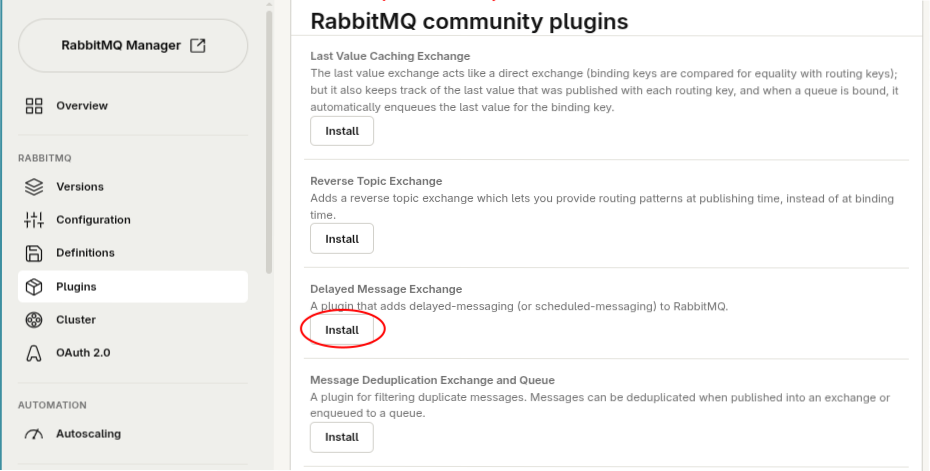
The RabbitMQ Core Team maintained the plugin for a long time until early 2026, when we, the CloudAMQP team, took over.
The plugin provides a new type of exchange: the delayed-message-exchange. This type of exchange behaves like any other exchange, configurable via the x-delayed-type argument, but holds each message for a delay before routing it to the appropriate queue. You can send messages to the delayed exchange with an arbitrary delay configured in the x-delay argument of the message, and each of them will be routed after its delay expires.
For instance, if you declare a delayed exchange with x-delayed-type set to fanout you will have a fanout exchange with delay. Bind a bunch of queues to it, publish a message with x-delay set to 10,000 (ten thousand milliseconds), and the bound queues will get the message 10 seconds after publishing it.
Where are my messages?
The idea of an exchange holding messages is not something you might be used to. The delayed message exchange stores messages in a special storage rather than in queues.
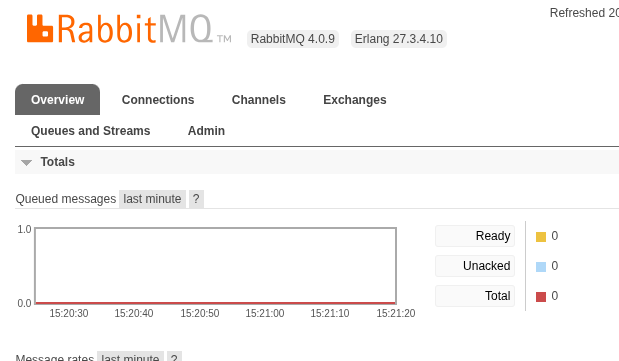
This can be a bit confusing from a user perspective. You might be publishing delayed messages, and the graph in the Management UI might stay flat. As you can see in the image below, that graph only shows queued messages. Because delayed messages aren’t queued, they don’t count toward the graph.
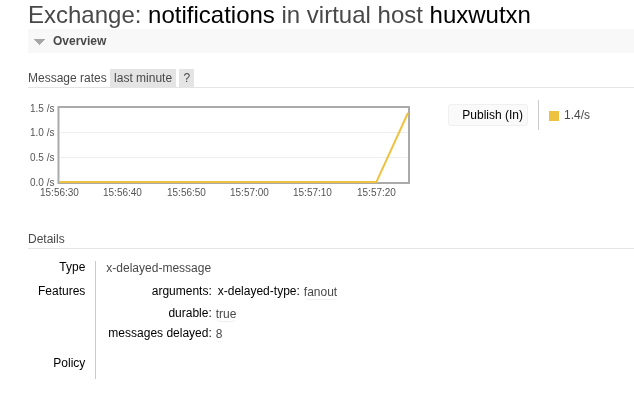
However, if you look at the Exchanges tab in the Management UI and click on any of your delayed exchanges, you will see the number of delayed messages stored under Overview > Details > Features.
What limitations does the plugin have?
One limitation of the Delayed Message Exchange plugin is that it does not replicate delayed messages. They survive node restarts because they are written to disk, but if you lose a node or disable the plugin, you will lose delayed messages.
Another limitation is that the mandatory message flag is not respected. When receiving a message marked as mandatory, RabbitMQ must respond with a basic.return message to the client if the message can’t be routed to any queue. Whether a delayed message can or can not be routed to the destination queue won’t be decided until the delay expires. By that time, the connection used to send the message might no longer exist. For that reason, the mandatory flag is not respected for delayed messages.
Closely related, the plugin attempts to publish a message to the destination queues only once. When a message’s delay expires and it is routed to the destination queue, if the queue is not found, the message is discarded.
As a final note, the plugin is not designed to handle high churn in incoming and outgoing messages, i.e., delayed messages being published to the broker and routed to their queues after the delay expires. The plugin uses a singleton worker process, so high message churn can make the plugin take longer than expected to process message delays.
Is there any alternative to the plugin?
If any of the above limitations feel relevant to prevent you from using the Delayed Message Exchange plugin for your use case, you may consider one of the following alternatives.
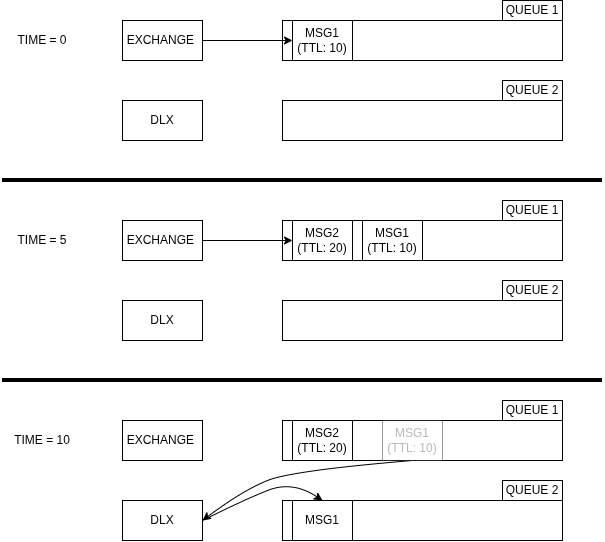
If you want to keep scheduling internal to the broker, you can combine message TTL with dead-lettering instead. Publish your messages to a queue configured with a TTL. When a message’s TTL expires, a dead-letter exchange picks it up and routes it to its final destination, effectively delaying it.
The diagram below shows this in practice. MSG1 and MSG2 land in QUEUE1 at time 0 and 5. When MSG1’s TTL expires after 10 seconds, it gets dead-lettered to the DLX exchange, which routes it to QUEUE2.
This approach has one limitation: only the message at the front of the queue can expire. A newer message with a shorter TTL still can’t jump ahead. If MSG2 had a TTL of 5 seconds, it would still be delayed until after MSG1, simply because MSG1 comes first in the queue.
You can also look at the delayed queue plugin for Tanzu RabbitMQ.
| Alternative | External scheduler | TTL + dead-lettering | Tanzu delayed queue plugin |
|---|---|---|---|
| How it works | A separate scheduler app or database trigger holds the message and publishes it when ready | Message sits in a TTL queue, then gets dead-lettered to its destination when the TTL expires | Same idea as the Delayed Message Exchange, built into commercial Tanzu RabbitMQ |
| Limitation | Extra moving part outside the broker | Only the head-of-queue message can expire; later messages with shorter TTLs still wait behind it | Requires a Tanzu RabbitMQ license |
A peek into the plugin internals: Leveled
In the section above, we mentioned that delayed messages don’t appear in the Management UI graphs because they are not queued. So you may ask yourself: if messages are not queued, where are they?
Why not in Khepri or Mnesia?
In addition to messages, RabbitMQ stores metadata. It stores information about users, virtual hosts, queues, exchanges, bindings, runtime parameters, and policies in an internal database. For years, Mnesia has stored that data. Third-party plugins, such as the Delayed Message Exchange, have typically used Mnesia as well.
However, since version 4.0, RabbitMQ has included Khepri, another database, as an alternative to Mnesia. It made it the default storage in 4.2 and the only one supported in 4.3. Third-party plugins have also migrated from Mnesia to Khepri, but when migrating the Delayed Message Exchange off of Mnesia, we decided to use a different data store.
Khepri was designed to store metadata. It keeps all data in memory. The plugin needs to store full messages, which are much larger and are written much more frequently than metadata. Keeping messages in memory was not an option. For the same reason, using Mnesia for the plugin was also not an option, since its fully-on-disk tables support only up to 2GB of data. These limitations led us to re-implement the Delayed Message Exchange using Leveled.
What is Leveled?
Leveled is a simple key-value in-disk data store, fully written in Erlang and inspired by LevelDB. It is a good fit for our use case, but we needed to complement it with some in-memory indexes.
The plugin’s internals can be summarized as a timer that always expires when the message with the shortest delay should be routed. Therefore, when reading from Leveled, we need a search operation that returns the message with the lowest expiration time. To do so in Leveled, we would need to use a fold operation, which iterates over all delayed messages on disk, reading and comparing their expiration times. This is too costly. For this reason, we decided to add an in-memory index alongside Leveled.
With an in-memory index, we avoided having the full payloads of the delayed messages exhaust memory. We keep only the object keys and some metadata in memory. We chose a data structure that lets us read Leveled optimally and avoid repeatedly iterating through it to find the next message to route.
Is this the definitive solution?
We put quite an effort into designing this in-memory index plus Leveled solution, optimizing things like index rebuilding after node restart, metrics bookkeeping for delayed message insertion and expiration, and more. However, this Leveled implementation was our medium-term solution to bridge the entire RabbitMQ transition from Mnesia to Khepri, so we will probably find a way to store messages that fits the plugin’s use case even better in the future.
But don’t worry! While re-implementing the plugin internals, we also decoupled data storage from the plugin’s behavior so it remains consistent regardless of where we store messages.
Talk to us!
If you are interested in the internals of the Delayed Message Exchange, take a look at the source code on GitHub. Feel free to come to us with questions or open a GitHub Discussion. As we mentioned before, there is still room for improvement, so we will gladly take contributions and participate in discussions.
Ready to delay some messages?
The Delayed Message Exchange plugin gives you a straightforward way to hold RabbitMQ messages for an arbitrary duration, configured per message, without building a separate scheduler or orchestrating a cumbersome TTL and dead-lettering setup.
If its trade-offs fit your scenario, or you just want to try it, spin up a free RabbitMQ instance on CloudAMQP and enable the plugin from the Plugins section of your Customer Console in a couple of clicks. If you are a CloudAMQP customer, our support team will be glad to help you set up or evaluate the plugin.
 Lois Soto López