If you’ve ever been on call, you know the real danger isn’t failure itself, it’s finding out too late. A queue silently growing, memory slowly creeping up, or consumers quietly disappearing can turn a small issue into a full outage.
This is where CloudAMQP alarms shine. They don’t just notify you when something goes wrong, they give you the tools to react automatically, and even let your infrastructure heal itself.
In this post, we’ll walk through:
- The most important CloudAMQP alarms you should enable
- How to configure them sensibly
- How to turn alarms into action, using webhooks and automatic upgrades
Infrastructure alarms: catch problems before performance degrades
Infrastructure alarms monitor the health of your broker itself. These are your early-warning system — they tell you when you’re approaching limits before RabbitMQ starts protecting itself by blocking publishers or connections.
CPU usage:
Consistently high CPU can lead to latency in message processing.
Recommendation:
Set a warning alarm at ~80% CPU. This gives you enough headroom to
investigate or scale before throughput drops noticeably.
Memory usage:
RabbitMQ enforces a memory high-water mark. Once it’s reached, publishers are blocked
— often with confusing symptoms upstream.
Recommendation:
Set a memory alarm at 70–80%. This range gives you time to react before the broker applies backpressure.
Disk space:
Disk exhaustion is one of the fastest ways to crash a broker, and recovery is rarely graceful.
Recommendation:
Set a disk usage alarm at 80% to avoid unexpected critical levels.
When infrastructure looks fine but your app isn’t
Your broker can be perfectly healthy while your application logic is failing. Queue-level alarms help you detect issues that are invisible at the infrastructure level
Queue length:
If a queue keeps growing, consumers aren’t keeping up, or they’ve stopped entirely.
Recommendation:
Set thresholds based on normal peak behavior, not theoretical limits. A queue that grows briefly during traffic spikes is fine; one that grows indefinitely is not.
Consumer count:
A critical queue with zero consumers means work is piling up silently.
Recommendation:
Set alarms for consumer count dropping below expected levels,
especially for queues that drive core workflows.
Some alarms use filtering by regexp; for example, the regexp
.*
will match all queues, while
^myqueue$
would match exactly the queue named
myqueue.
Leave these fields empty if you do not wish to apply any filtering.
You can use
Rubular
(a regular expression editor) to test your regex.
Connection and channel limits: catching leaks early
Connection and channel leaks often come from applications that don’t close connections properly, or from crash-looping services.
If unchecked, these leaks can exhaust broker limits and block new clients.
Recommendation:
Enable alarms for total connections and total channels. This helps you detect leaks before they cause failures.
Configuring alarms and recipients
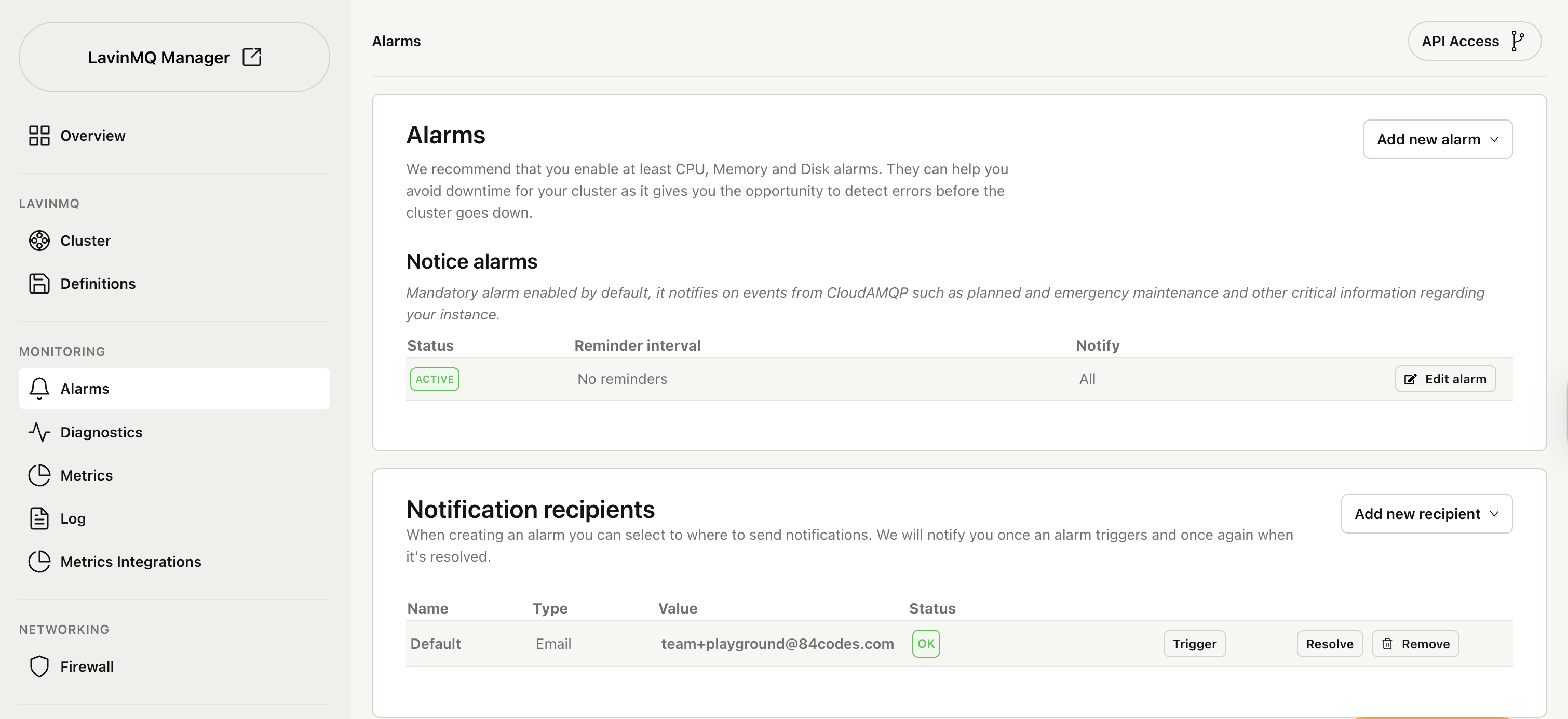
Alarms are only useful if they reach the right place. CloudAMQP supports notifications via: email, webhooks, Slack, PagerDuty, Microsoft Teams, OpsGenie, VictorOps, and Signl4.
Basic setup flow
- Navigate to your instance’s Alarm settings
- Add one or more recipients
- Create alarms and assign recipients
- Monitor the status column to verify delivery
Alarm thresholds
Most alarms require - a value threshold in percentage, count, or size, and a time threshold in seconds. Example: 1,000 connections sustained for more than 60 seconds.
Want to take alarms to the next level? Learn how to trigger API calls and set up automatic upgrades when alarms are triggered. Read more about API integration and automatic upgrades