CloudAMQP now supports webhook signature verification
Webhook signature verification is now available on CloudAMQP. By configuring a signing secret, your system verifies that incoming webhook requests are authentic, unmodified, and sent by CloudAMQP. This is an important security improvement, and in this blog post, we will show how you can set it up.
Using webhooks to trigger automated workflows from CloudAMQP events, like alerting, deployments, monitoring, and real-time notifications, can be great - but you need to know for sure that the request your systems are receiving is legitimate.
By inserting a signing secret, your server can verify that each webhook is authentic. This means that you’re adding an important layer of security to your systems, which can be especially important if your integrations already support or expect signed webhooks or in any scenario where the authenticity and integrity of incoming data are critical.
How signature verification works
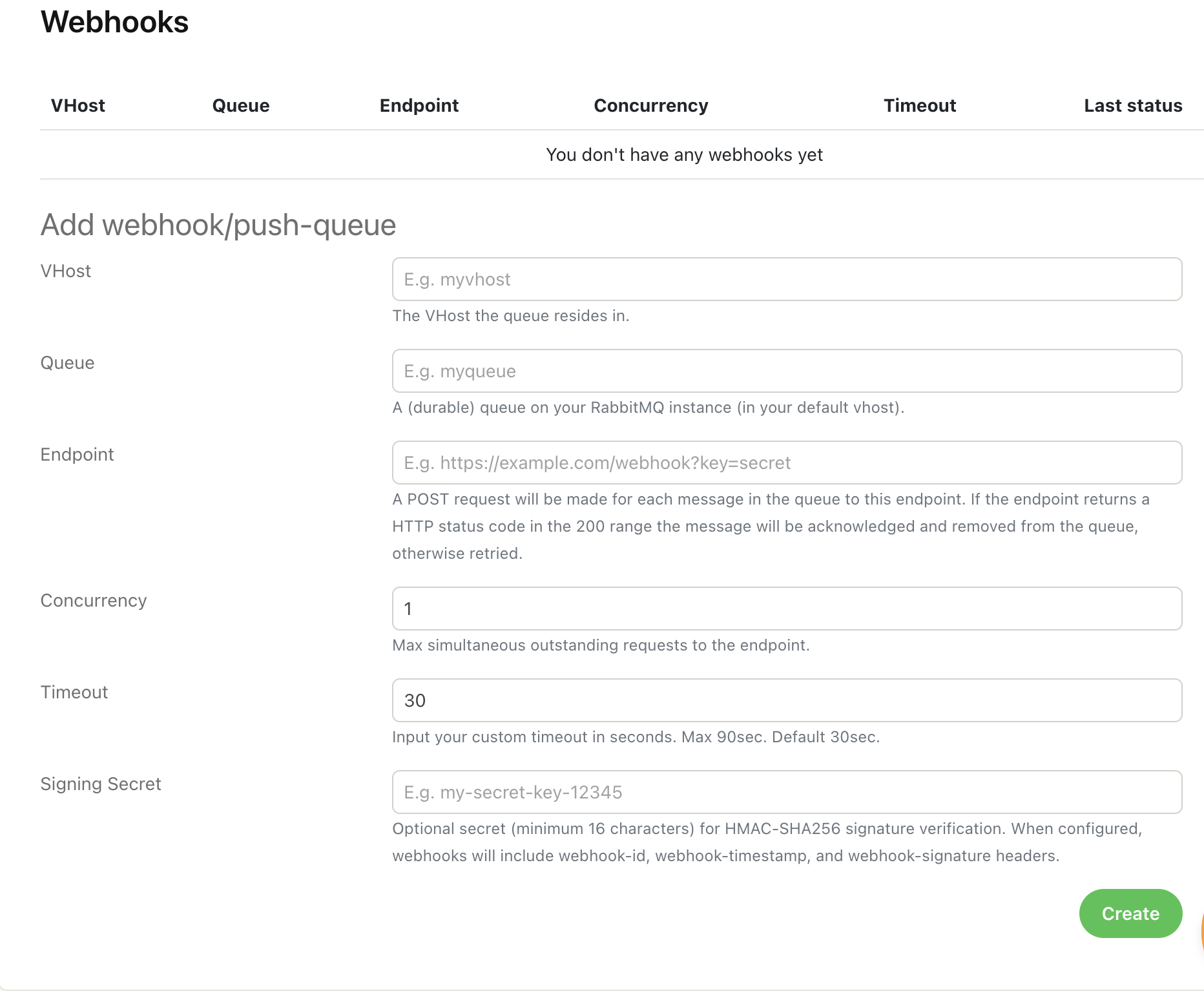
In the console for your instance, you are now given the opportunity to add a signing secret (shown in the example below). Once a signing secret is set, CloudAMQP will include three additional headers in every webhook delivery:
webhook-id, webhook-timestamp,
and
webhook-signature.
The signature is then computed using HMAC-SHA256 over the string
{webhook-id}.{webhook-timestamp}.{body}.
Your application then recomputes this signature using the same secret, then performs a timing-safe comparison to confirm the authenticity of the request.
Avoiding replay attacks
Replay attacks happen when someone takes a valid webhook request before it reaches its intended destination and resends it later.
Essentially, encryption doesn't need to be broken, but a replay attack can still lead to unwanted data transactions, potentially harming your system.
The webhook signature prevents such attacks by verifying that the
webhook-timestamp
is recent (for example, within three minutes) and that the request is fresh.
Example Webhook Signature
In this example, we’ll show how to enable webhook signature verification for CloudAMQP.
Step 1: Set a signing secret
In your CloudAMQP console, open Webhooks → create or edit a webhook → enter a signing secret (e.g.,
wemy-secret-key-12345
).
After saving, CloudAMQP will automatically include signature headers on every webhook.
See the UI below for where to create a webhook and set the signing secret:
Step 2: Extract the required headers
from flask import request

webhook_id = request.headers.get("webhook-id")
webhook_timestamp = request.headers.get("webhook-timestamp")
webhook_signature = request.headers.get("webhook-signature")

body = request.get_data(as_text=True)
Step 3: Validate the timestamp
import time

timestamp = int(webhook_timestamp)
if abs(time.time() - timestamp) > 300:  # 5 minutes
   raise ValueError("Stale webhook (possible replay attack)")
Timestamp validation is independent of the signing secret and does not change during key rotation.
Step 4: Compute the HMAC-SHA256 signature
import hmac
import hashlib

signed_payload = f"{webhook_id}.{webhook_timestamp}.{body}".encode("utf-8")
computed_signature = hmac.new(SIGNING_SECRET, signed_payload, hashlib.sha256).hexdigest()
Step 5: Compare signatures safely
if not hmac.compare_digest(computed_signature, webhook_signature):
   raise ValueError("Invalid webhook signature")
Zero-downtime key rotation
Signing secrets should be rotated periodically to reduce the impact of leaked or long-lived credentials. To support this without interrupting webhook deliveries, CloudAMQP allows multiple signing secrets to be configured at the same time.
When multiple secrets are configured, CloudAMQP will generate webhook signatures using all configured secrets, allowing webhook consumers to verify requests with any valid key during a transition period.
To rotate a signing secret without downtime:
- Add the new secret alongside the old one
- Update webhook consumers
- Remove the old secret
In the webhook configuration (see screenshot above), append the new secret to the existing one, separated by a space, and save the configuration. Example,
new-secret old-secret
CloudAMQP will now sign the webhook with both secrets.
Update the application receiving CloudAMQP webhooks so its signature verification logic accepts multiple signing secrets during the rotation period. The webhook should be accepted if the signature matches any of the configured secrets.
Update step 4 (Compute the HMAC-SHA256 Signature)
import os
import hmac
import hashlib

secrets = os.environ["WEBHOOK_SIGNING_SECRETS"].split()
signed_payload = f"{webhook_id}.{webhook_timestamp}.{body}".encode("utf-8")
def compute(secret: str) -> str:
   return hmac.new(secret.encode("utf-8"),signed_payload,hashlib.sha256).hexdigest()
Update step 5 (Compare Signatures Safely)
valid = any(
    hmac.compare_digest(compute(secret), webhook_signature)
    for secret in secrets
)

if not valid:
    raise ValueError("Invalid webhook signature")
Once all consumers are using the new secret, remove the old secret from the “Signing Secret” field, and save the configuration.
This approach ensures continuous verification during secret rotation, preventing failed webhook deliveries and eliminating downtime.
Full Python Verification with Key Rotation Example
import hmac
import os
import hashlib
import time
from flask import Flask, request, abort

app = Flask(__name__)

SIGNING_SECRETS = os.environ["WEBHOOK_SIGNING_SECRETS"].split()

@app.route("/cloudamqp-webhook", methods=["POST"])
def cloudamqp_webhook():
    webhook_id = request.headers.get("webhook-id")
    webhook_timestamp = request.headers.get("webhook-timestamp")
    webhook_signature = request.headers.get("webhook-signature")

    if not webhook_id or not webhook_timestamp or not webhook_signature:
        abort(400, "Missing signature headers")

    body = request.get_data(as_text=True)

    timestamp = int(webhook_timestamp)
    if abs(time.time() - timestamp) > 300:
        abort(400, "Stale webhook (possible replay attack)")

    signed_payload = f"{webhook_id}.{webhook_timestamp}.{body}".encode("utf-8")

    def compute(secret: str) -> str:
        return hmac.new(
            secret.encode("utf-8"),
            signed_payload,
            hashlib.sha256
        ).hexdigest()

    valid = any(
        hmac.compare_digest(compute(secret), webhook_signature)
        for secret in SIGNING_SECRETS
    )

    if not valid:
        abort(400, "Invalid signature")

    print("Webhook verified:", body)
    return "", 200
Summary
CloudAMQP now supports webhook signature verification, enabling developers to validate that incoming webhook requests are authentic, unmodified, and sent by CloudAMQP. The feature adds three signature headers and uses HMAC-SHA256 to sign each request. Timestamp validation helps prevent replay attacks, ensuring that only fresh, legitimate webhooks are processed. This security improvement is simple to adopt and strengthens any application relying on CloudAMQP webhooks.
We encourage all CloudAMQP users to enable webhook signature verification. It only takes a minute to configure and improves the security of your webhook-based workflows.
Learn more about Webhooks