Some articles on the web make Apache Kafka shine in front of RabbitMQ, and others do the opposite. A lot of us could plead guilty to listening to the hype and running with the crowd. I feel that it’s important to know that the decision of whether to go with RabbitMQ or Apache Kafka is dependent on the requirements of your project, and a true comparison can only be made if you have used them both with the correct setup in a fitting scenario.
84codes and I have been in the industry for a long time providing hosted solutions for both RabbitMQ through the service CloudAMQP, and Apache Kafka through the service CloudKarafka (deprecated January 27, 2025). Since I have seen so many use cases and different application setups by both CloudAMQP and CloudKarafka users, I feel like I can authoritatively answer use case questions, based on my experience, on both RabbitMQ and Apache Kafka.
In this article, my mission is to share insights based on the many developer-to-developer chats I have had over the years and to try to convey their thoughts about why they were choosing a specific message broker service over another.
The terminology used in this article includes:
A message in Kafka is often called a record, but I will refer to messages in order to simplify the information here.
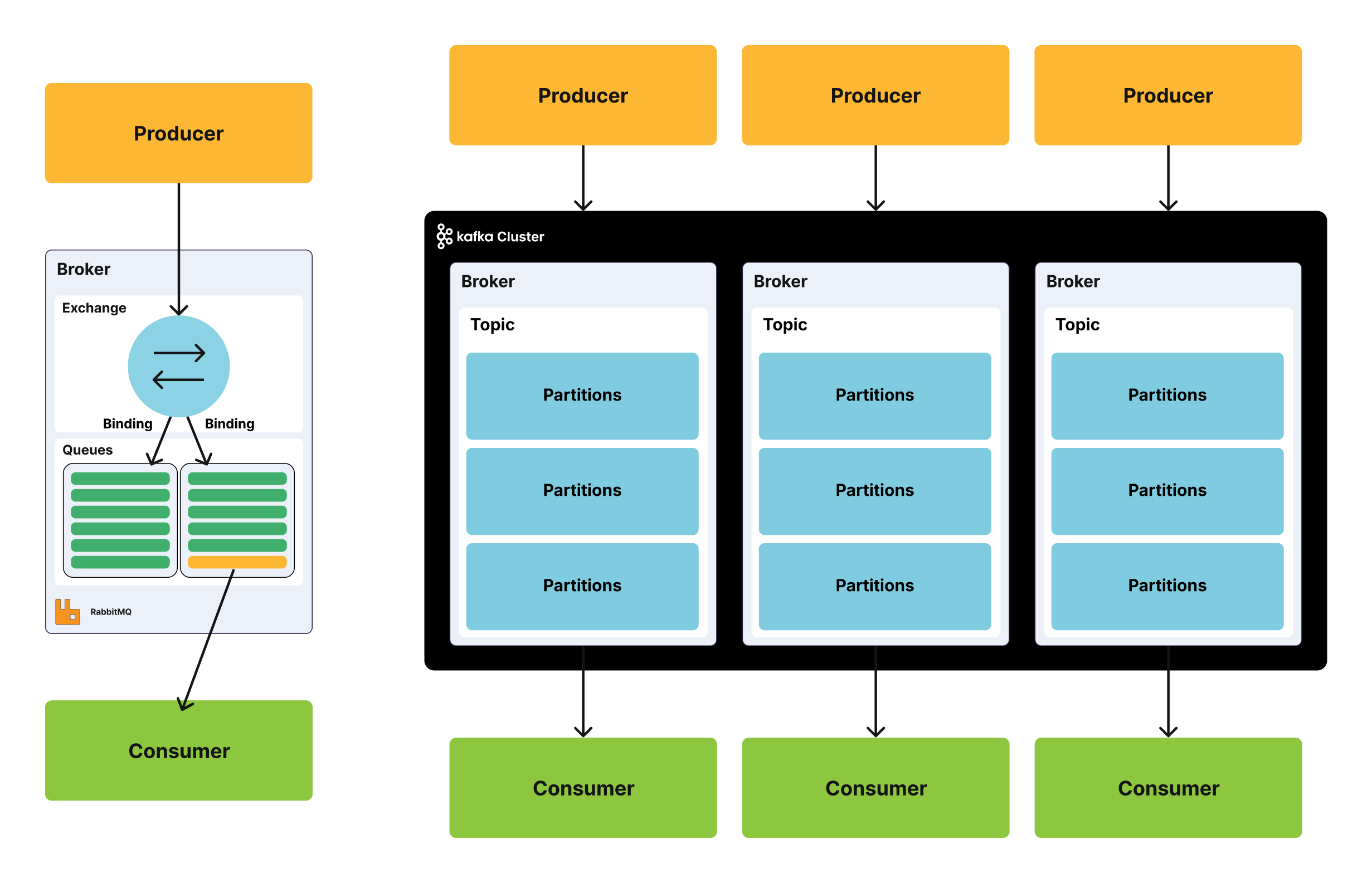
When I write about a topic in Kafka, you can think of it as a categorization inside a message queue. Kafka topics are divided into partitions which contain records in an unchangeable sequence.
Both systems pass messages between producers and consumers through queues or topics. A message can include any kind of information. It could, for example, have information about an event that has happened on a website or it could be a simple text message that triggers an event on another application.
This kind of system is ideal for connecting different components, building microservices, real-time streaming of data or when passing work to remote workers.
The big question: when to use Kafka, and when to use RabbitMQ?
A while ago I wrote an answer on Stack Overflow to answer the question, “Is there any reason to use RabbitMQ over Kafka?”. The answer is just a few lines, but it has proven to be an answer many people have found helpful. This is what I wrote:
“RabbitMQ is a solid, mature, general-purpose message broker that supports several protocols such as AMQP, MQTT, STOMP, and more. RabbitMQ can handle high throughput. A common use case for it is to handle background jobs or to act as a message broker between microservices. Kafka is a message bus optimized for high-ingress data streams and replay. Kafka can be seen as a durable message broker where applications can process and re-process streamed data on disk.”
Regarding the term “mature”: RabbitMQ has simply been on the market for a longer time than Kafka (2007 vs 2011, respectively). Both RabbitMQ and Kafka are “mature”, which means they both are considered to be reliable and scalable messaging systems.
I’d like to mention that I wrote that Stack Overflow answer years ago, and both systems have changed a lot since then. RabbitMQ has made significant strides towards becoming a message streaming platform with the introduction of streams, and Kafka has added queue-style consumption with share groups.
Consequently, the line between the two is less sharp than it used to be.
RabbitMQ vs Kafka: the short answer
Both now cover some of what the other does: RabbitMQ has streams for replay, and Kafka has share groups for queue-style work. The differences below are the ones that still matter when you choose.
Pick RabbitMQ when you:
- Pass jobs and commands between services, with retries, priorities, per-message expiry (TTL) and dead-lettering built into the broker.
- Need flexible routing, for example by routing key, pattern or header.
- Need low latency for each message, even at moderate volumes.
- Want to use standard protocols such as AMQP, MQTT or STOMP.
- Want to replay messages without running a second system. RabbitMQ streams do that.
Pick Kafka when you:
- Collect very large volumes of events that many systems read, each at its own pace.
- Keep data for a long time, or forever, and reprocess it often.
- Need log compaction, so you always have the latest value for each key.
- Want the Kafka ecosystem, such as Kafka Connect and Kafka Streams.
Consider LavinMQ when you want a lightweight AMQP broker with low latency, low resource use and streams. More about LavinMQ further down.
What is RabbitMQ and what is Kafka?
RabbitMQ is a message broker. Producers send messages to an exchange, and the exchange routes them to one or more queues. Consumers read from the queues. RabbitMQ has three queue types:
- Quorum queues store messages on disk and copy them to several nodes. A message is safe as long as most of those nodes are running. Use them for messages you can’t lose.
- Streams are append-only logs. Reading a message doesn’t remove it, so many consumers can read the same data and replay it.
- Classic queues run on a single node. They are fast and simple, and fit messages that don’t need to be replicated.
Read more in RabbitMQ queue types.
Kafka is a distributed event log. Producers write records to topics, and each topic is split into partitions. Records stay in the log until a retention limit is reached, and consumers keep track of how far they have read (their offset).
Both RabbitMQ and Apache Kafka play significant roles in large companies worldwide, proving the need for sophisticated and reliable messaging and streaming solutions. Various big industries rely on RabbitMQ, like Zalando, Adidas, WeWork, Wunderlist and Bloomberg.
Message replay: RabbitMQ streams vs Kafka
A RabbitMQ queue removes a message once a consumer has acknowledged it. That is how queues are meant to work.
RabbitMQ streams
A RabbitMQ stream keeps messages after they are read, just like a Kafka topic. Messages stay until the stream reaches a size limit or an age limit. A consumer can start reading from the beginning, from a specific offset, from a point in time, or only from new messages. Any number of consumers can read the same stream.
RabbitMQ streams have been part of RabbitMQ since 2021. You can use them with your existing AMQP client, or with the RabbitMQ stream protocol for the highest throughput. Consumers can also filter a stream on the broker, so they only get the messages they care about.
Read more in Can RabbitMQ replay messages? and our RabbitMQ streams series.
Super streams
A super stream splits one large stream into several smaller streams (partitions), much like a Kafka topic is split into partitions. The partitions are spread over the nodes in the cluster, so you can grow beyond what a single stream can handle.
When to use message replay
If you are using replay in both RabbitMQ and Apache Kafka, ensure that you are using it in the correct way and for the correct reason. Replaying an event multiple times that should just happen a single time, e.g. if you happen to save a customer order multiple times, is not ideal in most usage scenarios. Where a replay does come in handy is when you have a bug in the consumer that requires deploying a newer version, and you need to re-process some or all of the messages.
Kafka share groups: queues in Kafka
Kafka has traditionally assigned each partition to one consumer in a group. That limits how many consumers can share the work to the number of partitions.
Kafka now also has share groups, often called queues for Kafka. In a share group, several consumers can read from the same partition, and each record is acknowledged on its own. Kafka also counts delivery attempts. This makes Kafka a better fit for job-style work than it used to be.
RabbitMQ still has more tools for that kind of work, such as routing, priorities, per-message TTL and dead-lettering.
RabbitMQ vs Kafka latency: push vs pull
RabbitMQ pushes messages
RabbitMQ pushes each message to a consumer as soon as it arrives in the queue. The consumer doesn’t have to ask for it. This gives low latency for each message, which matters for things like user-facing requests, payments and IoT commands.
Set a prefetch limit, so a consumer doesn’t get more messages than it can handle at once.
Kafka consumers pull batches
Kafka consumers pull: they ask the broker for new messages from their offset, and get them back in batches. A pull request waits at the broker until new data arrives, so pull doesn’t have to mean slow.
The bigger difference is that Kafka is built around batching all the way. By default,
the producer waits up to 5 ms (linger.ms) to fill a batch before it sends anything.
Batching is what gives Kafka its very high throughput. You can tune Kafka for lower
latency, for example with linger.ms=0, at the cost of more, smaller requests.
What it means in practice
If you care most about the time from publish to delivery for each message, RabbitMQ or LavinMQ is usually the simpler choice. If you care most about moving huge volumes of data, Kafka’s batching works in your favor.
Protocols: AMQP, MQTT and the Kafka protocol
RabbitMQ supports several open, standard protocols: AMQP 0-9-1, AMQP 1.0, MQTT and STOMP, plus its own stream protocol. That makes it easy to connect different kinds of clients, from backend services to IoT devices. It also means you can move to another AMQP broker, such as LavinMQ, without rewriting your applications.
Kafka uses its own binary protocol over TCP. A few other products implement the Kafka protocol too, but there is no open standard behind it.
The ability of RabbitMQ to support different protocols means that it can be used in many different scenarios.
Message routing: exchanges vs topics
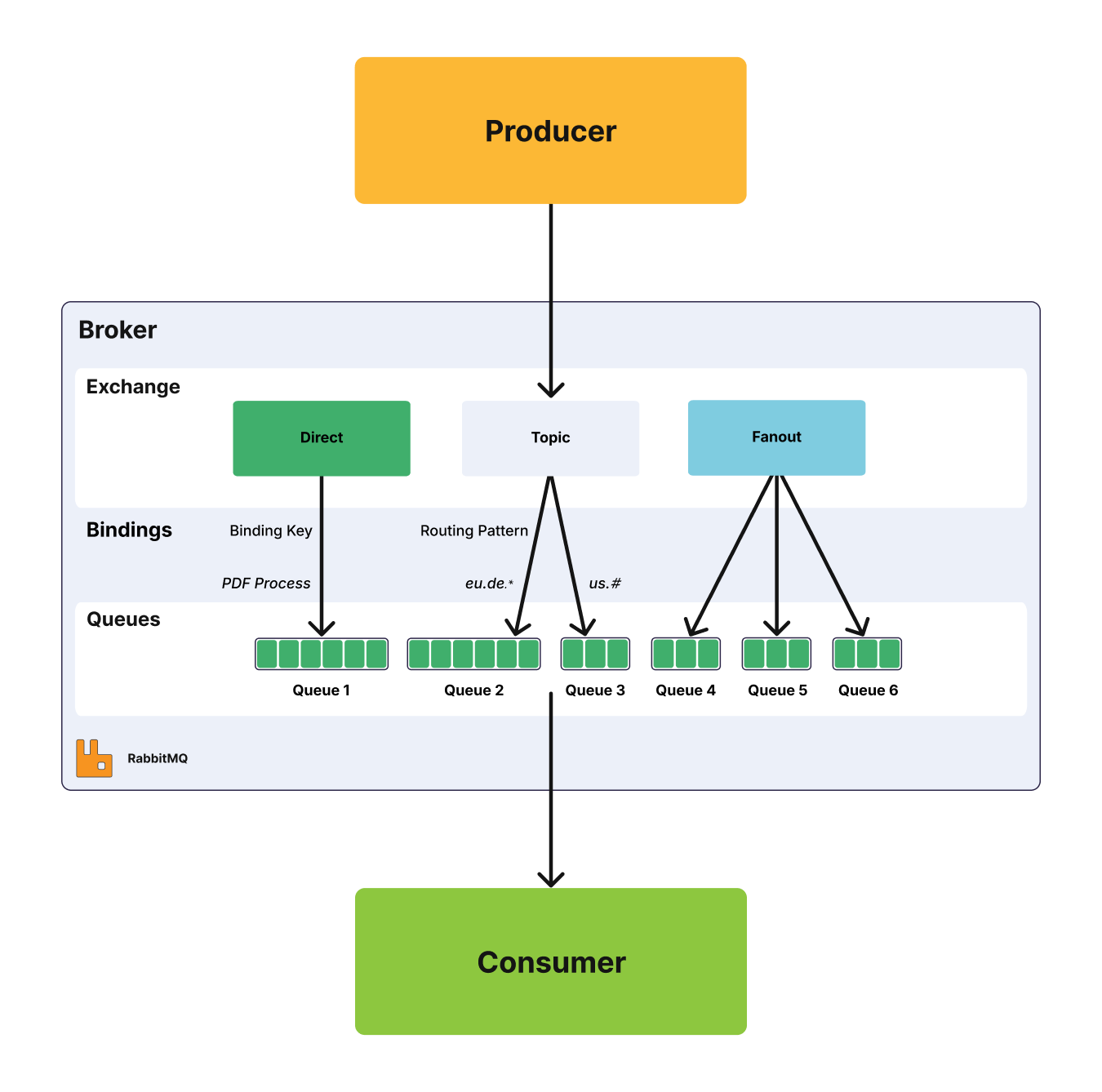
Chief among RabbitMQ’s benefits is the ability to flexibly route messages. Producers send messages to an exchange, and the exchange decides which queues get a copy, without additional code. RabbitMQ has four different routing options:
- Direct exchanges route messages to all queues with an exact match for the routing key.
- Topic exchanges also use the routing key, but allow wildcard matching along with exact matching.
- Fanout exchanges broadcast a message to every queue that is bound to the exchange.
- Headers exchanges route on message headers.
Check out our blog post for more information about the different exchange types.
Kafka does not support routing; Kafka topics are divided into partitions which contain messages in an unchangeable sequence. You can make use of consumer groups and persistent topics as a substitute for the routing in RabbitMQ, where you send all messages to one topic, but let your consumer groups subscribe from different offsets.
You can create dynamic routing yourself with help of Kafka Streams, where you dynamically route events to topics, but it’s not a default feature.
Message priority in RabbitMQ and Kafka
RabbitMQ supports message priorities in both classic queues and quorum queues. The priority of each message can be set when it is published, and messages with a higher priority are delivered first. So, when could priorities be used? Here is a simple example: We are running database backups every day. Thousands of backup events are added to RabbitMQ without order. A customer can also trigger a backup on demand, and if that happens, a new backup event is added to the queue, but with a higher priority.
A message cannot be sent with a priority level or delivered in priority order in Apache Kafka. All messages in Kafka are stored and delivered in the order they are received, regardless of how busy the consumer side is.
Message acknowledgments and offsets
“Acknowledgment” is the signal passed between communicating processes to signify receipt of the message sent or handled.
Both systems let producers know that the broker has stored a message: publisher confirms in RabbitMQ and producer acks in Kafka.
On the consumer side, RabbitMQ tracks each message. A consumer acknowledges a message when it has handled it, or rejects it (nack) so it goes back to the queue or to a dead-letter queue. This is useful when a consumer fails for a short time.
Kafka consumer groups track an offset, which is the position in the partition up to which messages have been handled. If a consumer restarts, it continues from the last committed offset. Consumers can commit offsets automatically or control it themselves. Share groups acknowledge records one by one instead.
High availability: quorum queues vs Kafka replication
RabbitMQ replicates data with quorum queues and streams. Both copy data to several nodes and keep working as long as most of those nodes are up. The older mirrored classic queues have been removed from RabbitMQ, so quorum queues are the way to go for replicated queues. Read more in moving from classic mirrored queues to quorum queues.
Kafka replicates each partition to several brokers. One broker leads the partition, and the others follow.
Both now handle their own cluster metadata with a built-in Raft-based store. RabbitMQ uses Khepri, and Kafka uses KRaft. Kafka no longer needs a separate ZooKeeper cluster, which makes it easier to run than it used to be.
Scaling RabbitMQ vs scaling Kafka
Scaling means the process of increasing or decreasing the capacity of the system. RabbitMQ and Kafka can scale in different ways: you can adjust the number of consumers, the power of the broker or add more nodes into the system.
Each queue in RabbitMQ can have many consumers, and these consumers can all “compete” to consume messages from the queue. The message processing is spread across all active consumers, so scaling up and down in RabbitMQ can be done by simply adding and removing consumers. On the broker side, you spread queues and streams over more nodes, and use super streams to split one large stream into partitions. A single queue lives on one leader node, so very busy queues are often best served by more powerful machines.
In Kafka, the way to distribute consumers is by using topic partitions, where each consumer in a group is dedicated to one or more partitions. You can use the partition mechanism to send each partition a different set of messages by business key, for example, by user id, location, etc. Share groups remove the one-consumer-per-partition limit for queue-style work. You scale the broker side by adding more nodes to the cluster or more partitions to topics.
Many people and blogs, including Confluent, are talking about how great Kafka is at scaling. And sure, Kafka can scale further than RabbitMQ since there will always be a limit on how beefy the machines are that you can buy. However, in this case, we need to remember the reason why we are using a broker. You probably have a message volume that both Kafka and RabbitMQ can support without any problems at all, and most of us don’t deal with a scale where RabbitMQ runs out of space.
Kafka log compaction
A feature that is worth mentioning in Apache Kafka, that does not exist in RabbitMQ, is the log compaction strategy. Log compaction ensures that Kafka always retains the last known value for each message key within the log for a single topic partition. Kafka simply keeps the latest version of a message and deletes the older versions with the same key.
Log compaction can be seen as a way of using Kafka as a database. You set the retention period to “forever” or enable log compaction on a topic, and voila, the data is stored forever.
An example of where we use log compaction is when we are showing the latest status of one cluster among thousands of clusters running. Instead of storing whether a cluster is responding or not all the time, we store the final status. The latest information is available immediately, such as how many messages are currently in the queue. Compacted logs are helpful when you need to restore the system after crashes or failures.
Monitoring RabbitMQ and Kafka
RabbitMQ has a user-friendly interface that lets you monitor and handle your RabbitMQ server from a web browser. Among other things, queues, connections, channels, exchanges, users and user permissions can be handled (created, deleted, and listed) in the browser, and you can monitor message rates and send/receive messages manually. RabbitMQ also exposes metrics for Prometheus. Read more about what to watch in Monitoring RabbitMQ in production.
For Kafka, we have a number of open-source tools for monitoring, and also some commercial ones, offering administration and monitoring functionalities. Kafka itself exposes its metrics through JMX.
RabbitMQ and Kafka licenses
RabbitMQ was originally created by Rabbit Technologies Ltd. The project became a part of Broadcom in 2023. The source code for RabbitMQ is released under the Mozilla Public License 2.0.
Kafka was originally created at LinkedIn. It was given open-source status and passed to the Apache Foundation in 2011. Apache Kafka is covered by the Apache 2.0 license. Some of the components often used in combination with Kafka are covered by another license called Confluent Community License, e.g. REST Proxy, Schema Registry, and ksqlDB. This license still allows people to freely download, modify, and redistribute the code (very much like Apache 2.0 does), but it does not allow anyone to provide the software as a SaaS offering.
The Mozilla Public License and the Apache License are both free and open-source software licenses. If the license around Kafka changes to something even stricter, this is where RabbitMQ has the advantage, as it can easily be replaced by another AMQP broker while Kafka cannot.
Is Kafka harder to run than RabbitMQ?
Personally, I thought it was easier to get started with RabbitMQ and found it easy to work with. And as a customer of ours said:
“We didn’t spend any time learning RabbitMQ and it worked for years. It definitely reduced tons of operational cost during DoorDash’s hyper-growth.” Zhaobang Liu, DoorDash
In my opinion, the architecture in Kafka brings more complexity, as it does include more concepts such as topics/partitions/message offsets, etc. from the very beginning. You have to be familiar with consumer groups and how to handle offsets.
Kafka no longer needs ZooKeeper, which has made it simpler to run. Still, as operators of both Kafka (through CloudKarafka) and RabbitMQ, we feel that it’s a bit more complicated to handle failures in Kafka. The process to recover or fix something is usually more time consuming and a bit more messy.
The Kafka ecosystem: Connect, Streams and Schema Registry
Kafka is not just a broker, it’s a streaming platform, and there are many tools available that are easy to integrate with Kafka outside the main distribution. The Kafka ecosystem consists of Kafka Core, Kafka Streams, Kafka Connect, Kafka REST Proxy, and the Schema Registry. Please note that some of these tools, like the REST Proxy and the Schema Registry, come from Confluent and are not part of Apache Kafka.
The good thing with all these tools is that you can configure a huge system before you need to write a single line of code.
Kafka Connect lets you integrate other systems with Kafka. You can add a data source that allows you to consume data from that source and store it in Kafka, or the other way around, and have all data in a topic sent to another system for processing or storage. There are many possibilities with using Kafka Connect, and it’s easy to get started since there are already a lot of connectors available.
The Kafka REST Proxy gives you the opportunity to receive metadata from a cluster and produce and consume messages over a simple REST API.
LavinMQ: a lightweight alternative to RabbitMQ and Kafka
LavinMQ is an open-source message broker built by 84codes, the team behind CloudAMQP. It speaks AMQP 0-9-1 and MQTT, so RabbitMQ clients work with it, and it is licensed under Apache 2.0. LavinMQ is written in Crystal, uses little memory and CPU, and delivers messages with low latency.
LavinMQ also supports streams, so you can replay messages without adding Kafka. Read more in Streaming with LavinMQ. You can run LavinMQ yourself or as a managed service on CloudAMQP.
RabbitMQ vs Kafka use cases
Up till here, there has been a lot of information about what one system can or can’t do. Here follow four main use cases describing how I and many of our customers have been thinking about and making a decision on which system to use. Of course, we have also seen situations where a customer has built a system where one system should have been used instead of the other one.
Use cases for RabbitMQ
In general, if you want a simple/traditional pub-sub message broker, the obvious choice is RabbitMQ, as it will most probably scale more than you will ever need it to scale. I would have chosen RabbitMQ if my requirements were to deal with system communication through channels/queues with adding streaming as an option and I would also consider it as the more beginner friendly option.
But even more interestingly, with streams you can also use RabbitMQ in high throughput, reading (re-reading) message streaming scenarios.
Use cases for Apache Kafka
In general, if you want a framework purely designed for storing, reading (re-reading), and analyzing streaming data, use Apache Kafka. It’s ideal for systems that are audited or those that need to store messages permanently. Also, consider navigating through the Apache Kafka ecosystem if you already have your system requirements sorted out.
Now, let’s look at different scenarios requiring middleware and see where Kafka or RabbitMQ is more ideal.
Long-running tasks and background jobs
Ideal for: RabbitMQ
Message queues enable asynchronous processing, meaning that they allow you to put a message in a queue without processing it immediately.
An example can be found in our RabbitMQ beginner guide, which follows a classic scenario where a web application allows users to upload information to a web site. The site will handle this information, generate a PDF, and email it back to the user. Completing the tasks in this example case takes several seconds, which is one of the reasons why a message queue will be used.
Many of our customers let RabbitMQ queues serve as event buses allowing web servers to respond quickly to requests instead of being forced to perform computationally intensive tasks on the spot.
Take Softonic as an example, they use RabbitMQ in an event-based microservices architecture that supports 100 million users a month.
Communication between microservices
Ideal for: RabbitMQ
Many customers use RabbitMQ for microservice architecture, which communicates between applications and avoids bottlenecks in passing messages.
You can for example read how Parkster (a digital parking service) are breaking down a system into multiple microservices by using RabbitMQ.
MapQuest is a large direction service supporting 23.1 million unique mobile users every month. Map updates are published to personal devices and software located in organizations and corporations. Here RabbitMQ topics spread over an appropriate number of queues. Tens of millions of users receive accurate enterprise-grade map information through the framework.
Data analysis: tracking, ingestion, logging and security
Ideal for: Apache Kafka, and possible with RabbitMQ streams
In all these cases, large amounts of data need to be collected, stored, and handled. Companies that need to gain insights into data, provide search features, auditing or analysis of tons of data justify the use of Kafka.
According to the creators of Apache Kafka, the original use case for Kafka was to track website activity including page views, searches, uploads or other actions users may take. This kind of activity tracking often requires a very high volume of throughput, since messages are generated for each action and for each user. Many of these activities, in fact all of the system activities, can be stored in Kafka and handled as needed.
Producers of data only need to send their data to a single place while a host of backend services can consume the data as required. Major analytics, search and storage systems have integrations with Kafka.
Kafka can be used to stream large amounts of information to storage systems, and these days hard drive space is not a large expense.
Real-time processing
Ideal for: Apache Kafka, and possible with RabbitMQ streams
Kafka acts as a high-throughput distributed system; source services push streams of data into the target services that pull them in real-time.
Kafka could be used in systems handling many producers in real-time with a small number of consumers, e.g. financial IT systems monitoring stock data.
Streaming services from Spotify to the Rabobank publish information in real-time over Kafka. The ability to handle high-throughput in real-time empowers applications, making these applications more powerful than ever before.
CloudAMQP uses RabbitMQ in the automated process of server setups, but we have used Kafka when publishing logs and metrics.
RabbitMQ vs Kafka comparison table
| RabbitMQ | Apache Kafka | |
|---|---|---|
| What it is | A general-purpose message broker | A distributed event log for high-volume data streams and replay |
| Primary use | Communication between and within applications, background jobs, and message streaming with replay | Storing, reading, re-reading and analyzing streaming data |
| Delivery model | Push, with a prefetch limit | Pull, in batches |
| Latency | Low per message | Optimized for throughput with batching; can be tuned for lower latency |
| Persistence | Queues keep messages until they are acknowledged. Streams keep messages until a size or age limit is reached. | Keeps messages until a size or age limit is reached, or forever with log compaction |
| Replay | Yes, with streams | Yes |
| Queue-style consumption | Yes, with competing consumers on a queue | Yes, with share groups |
| Routing | Flexible routing with direct, topic, fanout and headers exchanges | No routing; use separate topics or Kafka Streams |
| Message priority | Supported | Not supported |
| Replication | Quorum queues and streams | Replicated partitions |
| Cluster metadata | Khepri (built in, Raft-based) | KRaft (built in, Raft-based); no ZooKeeper |
| Protocols | AMQP 0-9-1, AMQP 1.0, MQTT, STOMP and the RabbitMQ stream protocol | Kafka's own binary protocol |
| Monitoring | Built-in management interface and Prometheus metrics | JMX metrics and third-party tools |
| License | Open source: Mozilla Public License 2.0 | Open source: Apache License 2.0 |
| Written in | Erlang | Java and Scala |
| First released | 2007 | 2011 |
RabbitMQ vs Kafka FAQ
Is RabbitMQ faster than Kafka?
It depends on what you measure. RabbitMQ usually delivers each message with lower latency. Kafka usually moves more data per second at very large volumes, thanks to batching.
Can RabbitMQ replace Kafka?
For many teams, yes. RabbitMQ streams give you a replayable log with retention, offsets and partitions (super streams). If you rely on log compaction or the Kafka ecosystem, such as Kafka Connect, Kafka is still the better fit.
Can Kafka replace RabbitMQ?
For simple queue-style work, Kafka share groups get close. If you need flexible routing, priorities, per-message TTL or standard protocols like AMQP and MQTT, RabbitMQ is the better fit.
Does Kafka have queues now?
Yes. Kafka share groups let several consumers share the work on the same partitions, and each message is acknowledged on its own. Share groups don’t add routing, message priorities or per-message TTL, so for job queues that need those, RabbitMQ is still the better fit.
Does Kafka still need ZooKeeper?
No. Kafka handles its own metadata with KRaft, and ZooKeeper is no longer supported.
Does RabbitMQ still have mirrored queues?
No. Classic queue mirroring has been removed from RabbitMQ. Use quorum queues for replicated queues, and streams for replay.
What is a low-latency alternative to Kafka?
RabbitMQ and LavinMQ both deliver messages with low latency, and both support streams for replay. LavinMQ is the lighter of the two.
Get started
You can try RabbitMQ or LavinMQ for free on CloudAMQP. Contact us if you’re unsure which one fits your project. We’re happy to help, even if the answer turns out to be Kafka.

 Lovisa Johansson