Celery with RabbitMQ and LavinMQ
Celery is a task queue library for Python.
This guide is for Celery 5.6. A runnable example with these settings is in python/celery in cloudamqp/examples.
There are some important settings for celery users on CloudAMQP, especially for users on shared instances with limited connections and number of messages per month.
Recommended settings
Install Celery with pip install celery, and set BROKER_URL to the AMQP
URL from your instance’s details page in the CloudAMQP console. Prefer the
amqps:// URL for TLS. Save these settings as celeryconfig.py:
import os

# Recommended settings for CloudAMQP, see https://www.cloudamqp.com/docs/celery.html
broker_url = os.environ.get("BROKER_URL", "amqp://guest:guest@localhost//")
broker_pool_limit = 1  # Decreases connection usage
broker_heartbeat = None  # CloudAMQP uses TCP keep-alive instead
broker_connection_timeout = 30  # Long timeout, e.g. for slow DNS lookups
result_backend = None  # Don't store results in the broker
event_queue_expires = 60  # Delete celeryev queues without consumers after a minute
worker_prefetch_multiplier = 1  # Fetch one message at a time
worker_concurrency = 50  # For I/O-bound tasks; for CPU-bound tasks, use the number of cores
The example’s concurrency of 50 is intended for I/O-bound work. Start with a
smaller value, such as worker_concurrency = 4, and size it for your workload
and plan. A prefetch multiplier of 1 means one reserved message per worker
process, in addition to tasks already running when using the default early
acknowledgements.
Save an application that loads these settings as tasks.py:
from celery import Celery
from celery.utils.log import get_task_logger

app = Celery("tasks")
app.config_from_object("celeryconfig")
logger = get_task_logger(__name__)


@app.task
def hello(name):
    message = f"Hello {name}!"
    logger.info(message)
    return message
Command-line arguments
Celery worker command-line arguments can reduce monitoring traffic. Place
worker options after worker and application options before it:
celery -A tasks worker --concurrency=4 --without-heartbeat --without-gossip --without-mingle
In another terminal, submit a task with
celery -A tasks call tasks.hello --args='["CloudAMQP"]'.
--without-heartbeat disables Celery’s worker heartbeat events, not AMQP
connection heartbeats. --without-gossip disables listening for other workers’
events, and --without-mingle skips synchronizing with other workers at startup.
These options reduce monitoring and worker coordination features; omit them
when you need those features, for example in Flower. Read more in the
documentation.
broker_pool_limit
Set the broker_pool_limit to 1 and make sure that your webserver spawns fewer processes/workers than your current CloudAMQP plan allows for concurrent connections.
The pool limit applies per process and is not a cap on all of an application’s connections. Workers also open connections for consuming tasks, events and remote control. Monitor your actual connection count and leave room for reconnections within your plan’s limit.
Make sure that you limit the number of
gunicorn web workers
with the
-w
flag and worker concurrency with
-c
For more information about Celery Execution Pools and what they are all about, read this article.
broker_heartbeat
We recommend disabling heartbeats. We’ve enabled low TCP keep-alive intervals on all our RabbitMQ servers so that stale connections will be detected on the TCP level instead of in the application layer.
broker_heartbeat = None
broker_connection_timeout
We recommend setting
broker_connection_timeout
to 30.
broker_connection_timeout
is the default timeout in seconds before it gives up establishing a connection to the CloudAMQP server.
broker_connection_timeout = 30
result_backend
By default celery is configured not to consume task results.
If you do want the task results and you want to
use RabbitMQ to store them, then use
result_backend = 'rpc'.
Read more about different backends here: http://docs.celeryproject.org/en/latest/userguide/configuration.html#result-backend
NOTE: We highly advise against using the deprecated
result_backend = 'amqp'
since it might end up consuming all memory on your instance.
worker_send_task_events
By default celery doesn’t send task events, but if you want to use a monitor tool for celery, like Flower, this must be enabled. Enable it with these settings
worker_send_task_events = True
event_queue_expires = 60
With event_queue_expires set to 60 seconds all celeryev. queues will be deleted after 1 minute - if they do not have any consumers.
worker_prefetch_multiplier
Set worker_prefetch_multiplier = 1 to limit the number of reserved tasks to
the worker’s concurrency. With the default early acknowledgements, running
tasks have already been acked, so the worker can reserve additional tasks.
To allow only one unacknowledged task per worker process, also set
task_acks_late = True. Only do this for idempotent tasks, because a task can
be delivered again if the worker loses its connection before acknowledging it.
For short tasks and high throughput, a larger multiplier may perform better.
Read more at
Celery’s prefetch documentation.
worker_concurrency
This is how many process/threads/green-threads that should process tasks at the same time. If your workload is CPU bound then limit it to the number of cores you got (this is the default), more will only slightly decrease the performance. But if you’re doing I/O, i.e. doing outgoing HTTP requests, talking to a database or any other external service, then you can increase it a lot, and gain a lot of performance, 200-500 is not unheard of. If your client is complaining about memory use being too high, you might need to set this to a lower value, for example 4.
Migrate between plans in Celery
task_always_eager = True executes tasks locally and synchronously. It does
not migrate queued tasks, scheduled tasks or results to a new broker.
Follow the cluster migration guide when moving to a new instance. Drain or transfer pending tasks, account for tasks already reserved by workers, and update the broker URL in both producers and workers. Keep the old instance until the migration is verified; removing an add-on destroys its broker and any messages left on it.
Celery Flower
Flower is a web based tool for real-time monitoring and administrating Celery clusters (it is still under development). From Flower it is possible to overview task progress and history, show task details and graphs and statistics about the tasks. You can overview scheduled tasks, revoke or terminate tasks and much more.
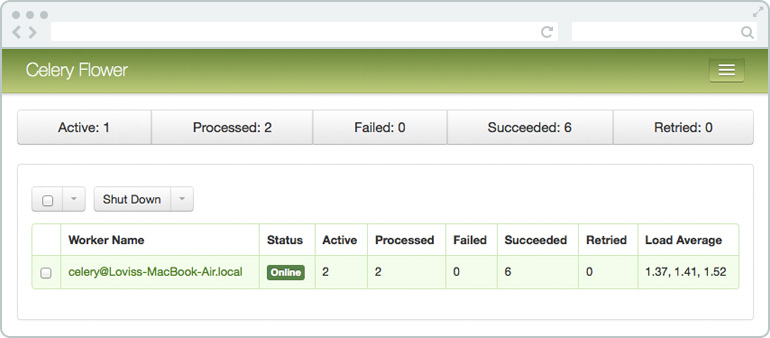
Flower uses the RabbitMQ Management Plugin to get info about queues. To get the broker tab working with CloudAMQP you need to set the --broker_api flag to the URL of the RabbitMQ HTTP API including user credentials, see example below. Broker API port should be 443.
pip install flower
celery -A tasks --broker=amqps://username:password@hostname:5671/vhost flower --broker_api=https://username:password@hostname:443/api/
Use amqps:// for the TLS broker connection. The management API URL is
separate and uses https://.
Thanks for your feedback!